

What Is an AI Agent and How Is It Different from a Chatbot?
A support chatbot can tell you your order shipped. It cannot reroute the shipment, email the warehouse, check inventory across three systems, and confirm the fix back to you without a human stepping in. That gap, between answering and actually finishing the job, is the entire story behind this year’s biggest AI terminology shift.
If you have noticed every major AI vendor suddenly talking about “agents” instead of just “chatbots” or “assistants,” you are not imagining things. Google Cloud, Microsoft, NVIDIA, and several enterprise software makers have spent 2026 converging on a shared definition. Understanding what is an AI agent and how is it different from a chatbot now matters for anyone choosing tools for everyday work, not just developers building them.
This article explains the distinction in plain terms, based on researched information from current vendor documentation and industry comparisons, so you can tell which category a tool actually belongs to before you rely on it.
Key Takeaways
- An AI agent is a system built to complete goals through reasoning, planning, tool use, and a degree of autonomous decision-making. A chatbot is built to answer questions and guide conversations.
- The clearest practical difference is goal completion versus question answering: chatbots respond within a conversation; agents take action across tools and systems.
- Agents typically keep memory across sessions and tasks, while chatbots usually reset after a conversation ends.
- Many products now layer the two together, a chatbot-style interface sits on top of one or more agents doing the actual work behind the scenes.
- Agents cost more to run, carry more risk because they can take real actions, and are not automatically the better choice for simple, repetitive requests.
What Is an AI Agent?
An AI agent is a software system that uses artificial intelligence to pursue a goal on your behalf, rather than simply responding to a single message. Instead of waiting for you to spell out every step, an agent reasons about what needs to happen, breaks that goal into smaller steps, chooses which tools or systems to use, and keeps working until the task is done or it needs your approval to continue.
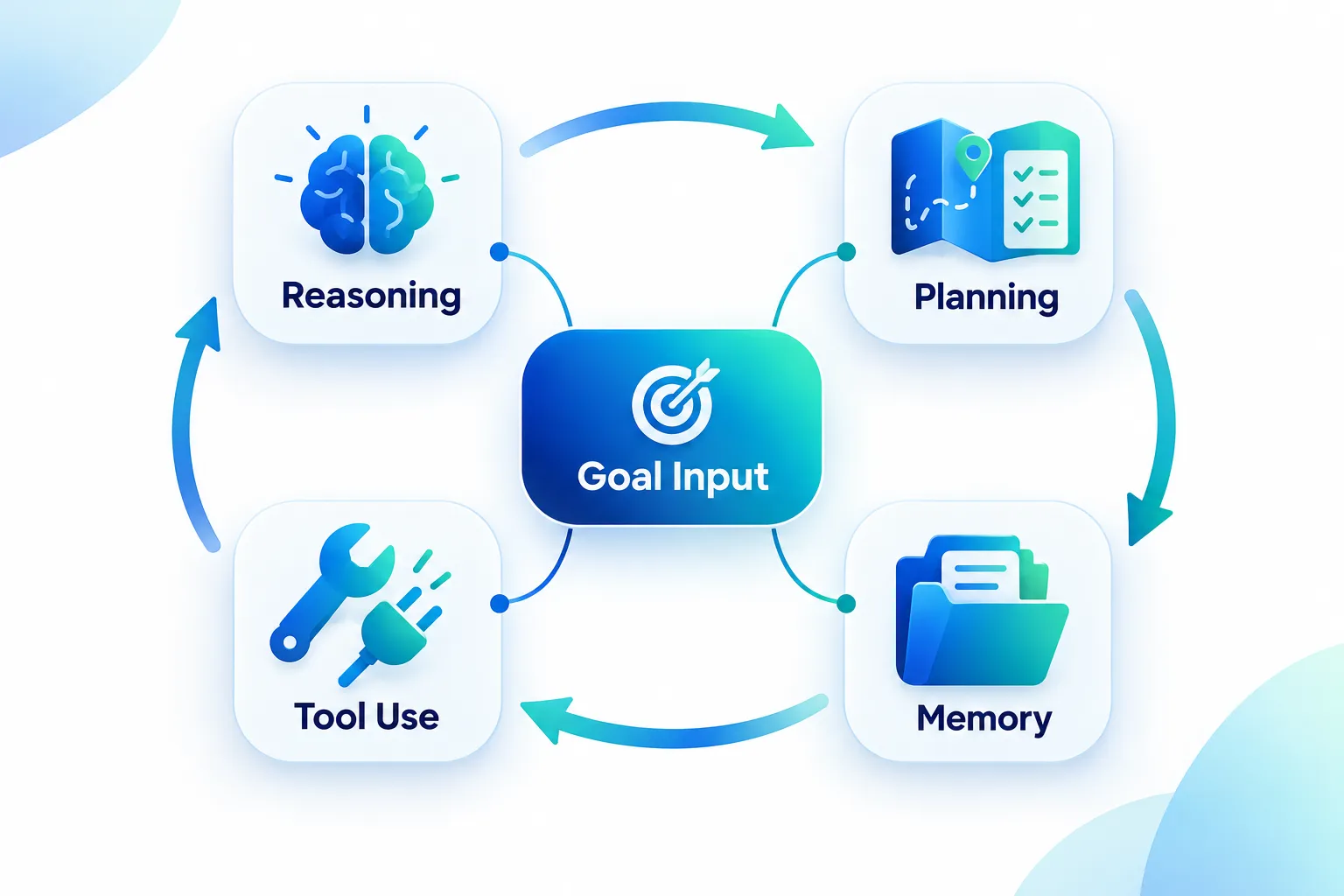
Google Cloud’s framing, updated in October 2026, places agents at the top of an autonomy scale that also includes “assistants” and “bots”, with agents having the greatest ability to make independent decisions. Microsoft’s Copilot documentation describes something similar: agents act on the inputs they perceive to achieve a goal, and some variants are described as fully autonomous, operating without a human in the loop and adjusting behavior based on new data. NVIDIA’s technical glossary adds that these systems are expected to reason, plan, and execute multi-step tasks, with built-in privacy and policy controls because they can touch sensitive systems and data.
Four capabilities show up again and again in how vendors define agents:
- Reasoning, working out what steps a goal actually requires
- Planning, sequencing those steps in a workable order
- Tool use, calling on other software, databases, or APIs to get things done
- Memory, retaining context from earlier sessions so the agent does not start from zero each time
None of those four things are required for something to be called a “chatbot.” That is the core of the distinction, and it is worth sitting with before looking at specific products.
What Is a Chatbot, Exactly?
A chatbot is a conversational interface built to answer questions, retrieve information, or walk a user through a predefined flow. It responds to what you type, usually by pulling from a fixed knowledge source or following scripted logic, and it generally stops there. Adobe’s description of chatbots is blunt about this: they are reactive, waiting for a prompt and retrieving information from sources that were set up in advance, rather than deciding on their own what to do next.
Slack’s product team made a similar point in an October 2026 breakdown, noting that chatbots simulate conversation using rules or natural language processing, but they do not perceive an environment, make independent decisions, or act without a human directing each step. A chatbot can be genuinely useful, fast FAQ answers, order status lookups, basic troubleshooting scripts, without ever needing the reasoning-and-planning loop that defines an agent.
It is also worth separating “simple chatbot” from “chatbot built on a large language model.” Many AI chat tools today, including general-purpose assistants people use for writing or research, behave more like sophisticated chatbots than true agents unless they have been explicitly given tools, memory, and the ability to act. If you have compared general AI chat tools before, our comparison of ChatGPT, Claude, and Gemini is a useful reference point for understanding where conversational strength ends and agentic capability begins.
What Is an AI Agent and How Is It Different from a Chatbot? The Core Differences
Enterprise analysts summarize the split in a short phrase worth remembering: chatbots answer questions, agents complete tasks. Glean’s enterprise research puts it that way directly, and it lines up with how Adobe, Hostinger, Domo, and ServiceNow each describe the two categories.
The practical differences come down to five things: autonomy, proactivity, tool use, workflow complexity, and memory.
| Capability | Chatbot | AI Agent |
|---|---|---|
| Primary job | Answer questions, guide a scripted conversation | Complete a goal across multiple steps |
| Autonomy | Waits for each new prompt | Makes decisions within a task without constant direction |
| Tool and system use | Usually one knowledge base or script | Calls multiple tools, apps, or business systems |
| Workflow handling | Linear, predictable interactions | Multi-step, cross-system workflows |
| Memory | Mostly limited to the current session | Can retain context across sessions and tasks |
| Typical cost | Lower, simpler compute needs | Higher, due to planning and tool orchestration |
Airbyte’s September 2026 technical comparison describes this gap in operational terms: a chatbot returns an answer from a single knowledge source, while an agent “directs its own execution”, the underlying model selects tools, reads intermediate results, and adjusts its plan mid-task, sometimes coordinating across several business systems such as a CRM, a support desk, and a messaging platform in the same workflow.
Glean and Google Cloud both add a memory distinction that matters in daily use: a chatbot is mostly a read-only responder confined to whatever happened in the current conversation, while an agent can carry context forward, reusing outcomes from a past task when handling a new one.
The Layered Reality: Chatbots as the Front Door, Agents as the Engine
Here is where the distinction gets less tidy in practice, and it is the part most buying guides skip. Many products now use a chatbot-style interface as the front door, with one or more agents doing the actual execution behind it.
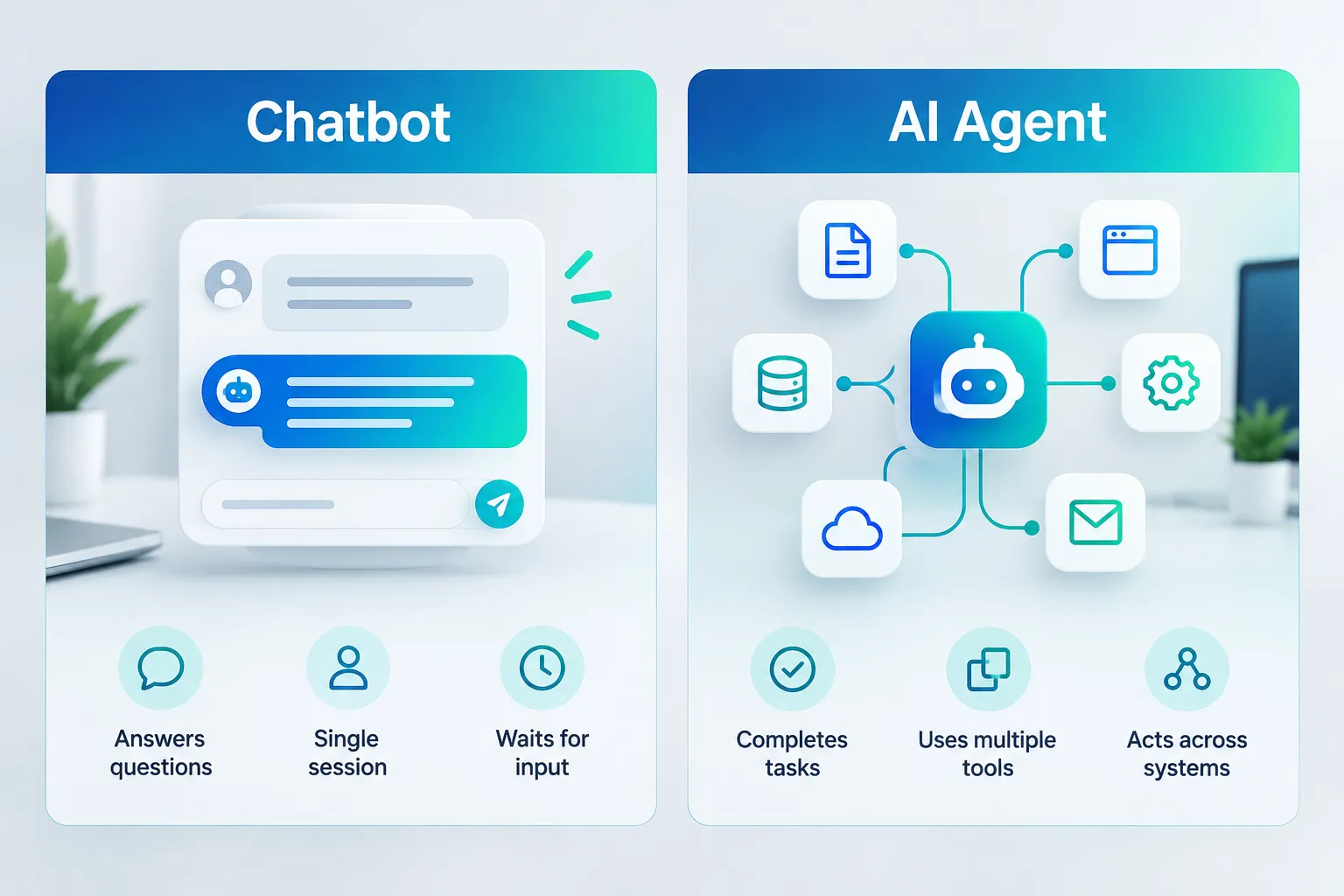
Glean’s enterprise architecture recommends exactly this pattern: a chatbot captures what the user wants and manages the back-and-forth dialogue, then hands the actual goal off to an AI agent that plans and executes the needed actions across connected systems, under permission controls. ServiceNow describes its agents similarly, built to pursue a goal, use tools, and coordinate steps within approved permissions, which implies a conversational layer sitting separately from the execution layer.
This matters for anyone evaluating a product labeled “AI agent.” The honest question is not “does it have a chat window?”, almost everything does, but “what happens after I submit a request? Does it just generate text, or does it actually call other tools and change something in the real world?” If you are researching automation tools for your own workflows, our Agents & Automation section tracks this distinction across specific products as it evolves.
When to Choose a Chatbot vs an AI Agent
Neither option is universally better. The right choice depends on what the task actually requires.
Choose a chatbot when:
- The request is predictable and repetitive (FAQs, order status, basic troubleshooting scripts)
- A single knowledge source or system is enough to answer it
- You need a fast, low-cost, read-only response
- There is no need to change data or trigger an action elsewhere
Choose an AI agent when:
- The task spans multiple tools or systems (for example, checking a CRM, updating a ticket, and sending a confirmation email)
- The steps required are not fully known ahead of time and need to be planned
- The task benefits from remembering earlier context across sessions
- Someone needs to review or approve the agent’s output before it acts on sensitive data
Slack’s guidance from October 2026 follows this same logic: use chatbots for structured, linear interactions, and bring in agents once workflows demand adaptability, decision-making, and coordination across more than one system. Hostinger’s step-by-step guidance, published in September 2026 and updated the following month, makes a similar case and adds a cost note worth repeating: agents generally cost more to run than chatbots because they plan, call multiple tools, and verify results before finishing a task, which adds compute and integration overhead that a simple chatbot does not carry.
This is also a good moment to be honest about limitations. More autonomy is not automatically a benefit. A chatbot that simply answers a question has less room to make an expensive mistake than an agent that can update records, send emails, or trigger a workflow on its own. If you are weighing whether a paid AI plan is worth it for your own use case, our breakdown of ChatGPT Plus versus the free plan walks through a similar cost-versus-capability tradeoff at the consumer level.
Risks, Governance, and What Can Go Wrong
Because agents can take real actions rather than just generate text, the stakes of getting something wrong are higher. NVIDIA’s documentation is direct about this, noting that autonomous agents need built-in privacy and policy controls precisely because they can act on sensitive data and systems. ServiceNow and Glean both emphasize permissions and guardrails at the exact point where a conversational interface hands a goal off to an agent, since that handoff is where an agent could modify data or trigger a workflow a chatbot never could.
There is also a reliability gap worth knowing about before trusting an agent with something important. A paper covered by Agentry.news in late September 2026, “Evaluating Test-Time Scaling of General LLM Agents,” found a meaningful gap between how agents perform on isolated test benchmarks and how they perform in realistic, unified environments where multiple systems interact at once. In plain terms: an agent that looks strong in a controlled demo does not automatically perform as well once it is juggling several real tools and unpredictable inputs at the same time. Separately, coverage of NVIDIA’s coding-agent research (sometimes referred to as SoL-Pi) showed an AI system discovering previously unknown issues across more than 500 test environments through automated research loops, a sign of real progress, but also a reminder that testing agents across diverse, realistic scenarios remains a genuinely hard problem.
Agents also inherit a familiar AI weakness: they can still generate incorrect or fabricated information as part of their reasoning, which becomes more consequential when that reasoning drives an action rather than just a sentence on a screen. If you want a deeper look at how and why AI systems produce confident-sounding errors, our explainer on AI hallucinations and how to catch them is directly relevant here, since the same failure mode applies to agents, not just chatbots.
For now, the practical takeaway is to treat autonomy as a dial, not a switch. Microsoft’s own materials distinguish fully autonomous agents from more bounded, assisted patterns that still rely on user direction. JetBrains describes this as agents making “bounded decisions” rather than having unrestricted control, a design choice meant to keep automation inside predefined limits rather than letting a system act without any check at all.
Where This Is Heading
The direction over the next year or two looks fairly consistent across vendor documentation: many tools that are marketed as “chatbots” today will likely become thin conversational front ends sitting on top of one or more specialized agents doing the real work. Organizations are expected to standardize on agent platforms that manage tools, memory, and governance in one place, rather than building separate one-off integrations for every workflow.
Chatbots are not going away. They remain the right fit for simple, read-only, support-style interactions where speed and low cost matter more than independent decision-making. But in enterprise software and developer tooling, expect marketing language to shift further toward “agentic” features, planning, tool orchestration, cross-system action, rather than conversational polish alone. If you track AI tool releases regularly, our AI & Tech Updates section and AI Comparisons section are good places to watch this shift as specific products update their capabilities.
Frequently Asked Questions
Is ChatGPT a chatbot or an AI agent? By default, a general chat interface like ChatGPT behaves mostly as a conversational assistant. It becomes more agent-like when it is given tools, plugins, or connected systems that let it take actions, browsing, running code, or calling external services, rather than only generating text replies.
Can a chatbot ever complete multi-step tasks? A scripted chatbot can follow a predefined multi-step flow, such as a guided troubleshooting sequence, but it is following a fixed path rather than reasoning about new steps on the fly. That planning ability is what separates it from an agent.
Do AI agents need human approval to act? It depends on the design. Some agents are built as fully autonomous, acting without human involvement; others are intentionally bounded, requiring approval before taking sensitive actions like sending an email or changing a record. Check a specific product’s documentation rather than assuming either behavior.
Are AI agents more expensive to use than chatbots? Generally, yes. Agents call multiple tools, verify intermediate results, and often retain memory across sessions, all of which add compute and integration cost compared with a simple chatbot that answers from one knowledge source.
What is the biggest risk with AI agents compared to chatbots? Agents can take real actions, updating systems, sending communications, triggering workflows, so an error has more consequence than a chatbot giving a wrong answer in a conversation. Permissions, guardrails, and human review points matter more as autonomy increases.
Should a small business use a chatbot or an AI agent first? Start with a chatbot for predictable, single-system needs like FAQs or basic customer questions. Move to an agent only when a workflow genuinely spans multiple tools or systems and needs decisions made along the way, since agents add cost and complexity that is not worth it for simple requests.
Conclusion
The short answer to what is an AI agent and how is it different from a chatbot comes down to one practical distinction: chatbots answer, agents act. A chatbot is built to respond within a conversation, usually from one knowledge source, and it typically resets once the session ends. An AI agent is built to take a goal, reason through what it requires, plan the steps, call on multiple tools or systems, and keep working, sometimes across sessions, until the task is finished or a human needs to step in.
Neither one is automatically the right choice. For everyday work like FAQs, status checks, and simple support flows, a chatbot is usually faster, cheaper, and lower-risk. For tasks that span several systems, require planning, or benefit from remembered context, an agent is worth the added cost and the added governance it requires. Before trusting a tool labeled “agent” with anything important, check what it can actually do, what permissions it has, and whether a human reviews its actions, not just whether it has a chat window.
For ongoing, practical guidance on choosing and evaluating these tools as they change, browse Tech Clearly’s Practical AI coverage or explore the full blog for comparisons and step-by-step guides on specific agent and automation tools.
Meta Title: What Is an AI Agent? How It Differs from a Chatbot
Meta Description: What is an AI agent and how is it different from a chatbot? Clear comparison of goals, autonomy, memory, and when to use each one.
AI agents, chatbots vs AI agents, autonomous AI, agentic AI, conversational AI, AI automation, tool use in AI, AI workflow automation, enterprise AI agents, AI governance, large language models, AI reasoning and planning
Contributing writer at Tech Clearly.